Free & open source · MIT licensed

Preview medical images,
right from Explorer.

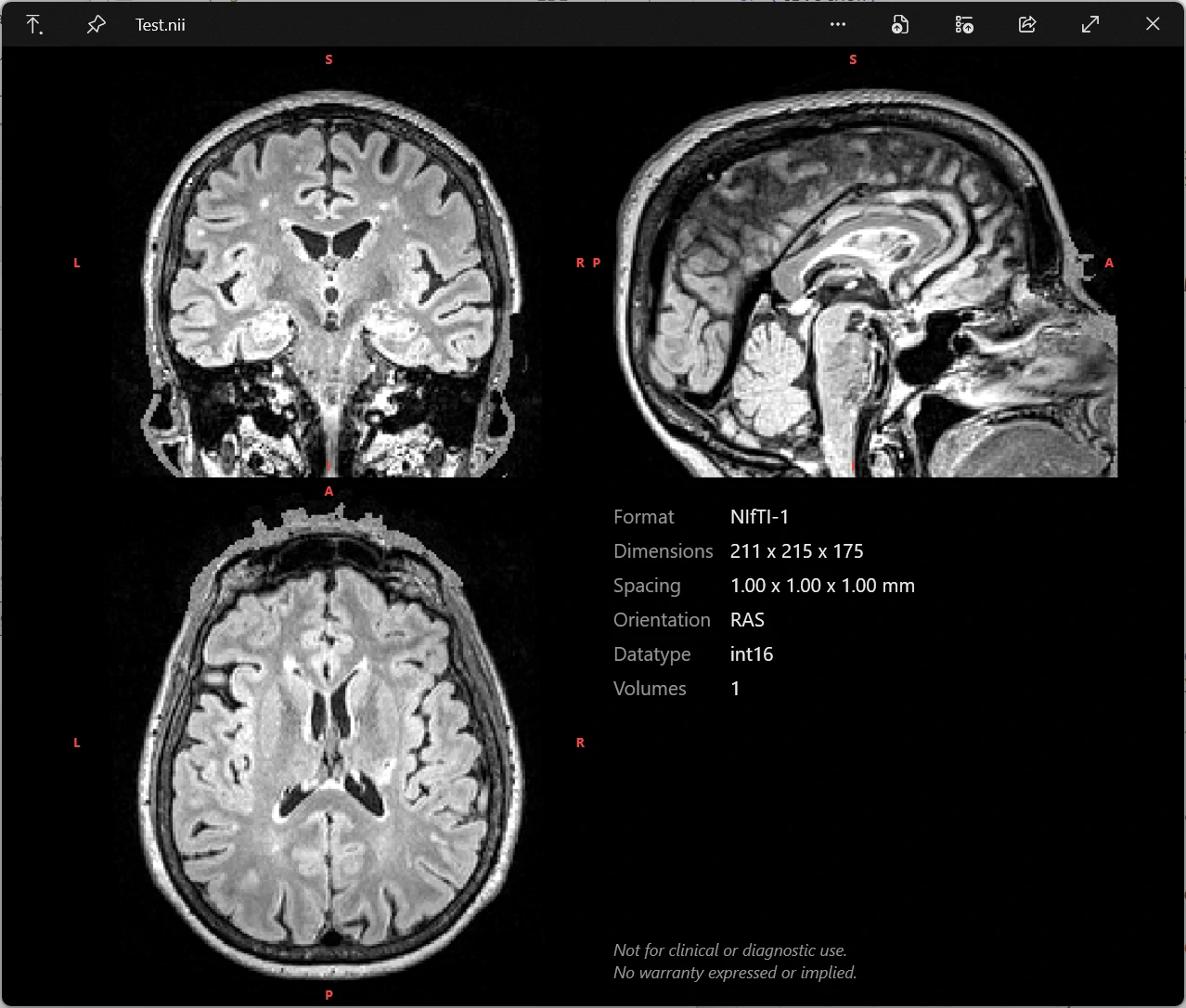
MIQ-Win is a lightweight plugin for QuickLook that previews medical volume images on Windows. Press Space on a supported file in Windows Explorer to instantly get an interactive orthogonal slice view alongside a metadata panel. Scroll to move through the volume, click to navigate. No app to open, no waiting.

Requires QuickLook 4.5+ · Windows 10 & 11 · No admin rights needed

MIQ-Win QuickLook preview showing a orthogonal slice grid and metadata panel

The preview is live: scroll to move through slices, click any pane to link all three, right-click+drag to adjust window/level, Alt+scroll to step through 4-D volumes.

🧩
MIQ-Win is a QuickLook plugin, not a standalone app. It extends QuickLook, the free, open-source “press Space to preview” tool for Windows, so that medical volume images preview just like documents and images already do. Install QuickLook first, then drop in the plugin.
Why MIQ-Win

Built for a quick look,
and nothing else

A convenience tool for quickly inspecting medical image files from Explorer. It prioritizes speed and ease of use over advanced visualization, and is not meant to replace dedicated medical image viewers.

⌨️

Just press Space

Native QuickLook integration. Select a file in Explorer, hit Space, and the orthogonal slices appear instantly.

🖱️

Interactive, not a snapshot

Coronal, sagittal and axial in one grid. Scroll over any pane to move through slices, click to link all three to the same point, right-click+drag to adjust window/level, Alt+scroll to step through 4-D volumes.

Fast by design

Uncompressed files load instantly. Gzip-compressed files use native libdeflate to speed up decompression.

🎛️

Customizable

Tune intensity scaling, reorientation, colors, the metadata panel and more in a plain-text MIQ.settings.ini.

📐

Honest orientation

Shows data as stored on disk by default, so you see the raw orientation. Optional reorientiation to neurological and radiological views.

🎨

Segmentation colors

Optionally colors integer label maps (segmentations), with canonical FreeSurfer LUT for aseg/aparc segmentations. Off by default, activate via MIQ.settings.ini.

Research Companion

The formats you actually use

Most file formats are supported uncompressed and gzip-compressed. NRRD support covers self-contained .nrrd files (raw and gzip encodings).

NIfTI-1 & NIfTI-2
.nii .nii.gz
FreeSurfer
.mgh .mgz .mgh.gz
MRtrix
.mif .mif.gz
NRRD
.nrrd

MIQ-Win only supports volume files in research formats, DICOM is currently not supported.
The plugin relies on the file extension to determine the format, so it's important that files have the correct extension.

Get started

Install in under a minute

  1. Install QuickLook 4.5 or newer, and make sure it's running (it lives in the tray).
  2. Download the latest release (QuickLook.Plugin.MIQ.qlplugin).
  3. Press Space on the .qlplugin file, then click “click here to install this plugin”.
  4. Restart QuickLook (tray icon → quit, then relaunch).
  5. Press Space on any supported file in Explorer. To update later, repeat these steps.
  6. Customize (optional). Right-click the QuickLook tray icon → Open Data Folder and edit MIQ.settings.ini to tune intensity scaling, colors and the metadata panel. Changes apply on the next preview.
  1. Quit QuickLook from the tray icon; the plugin DLL is locked while it runs. To also delete your settings, right-click the tray icon → Open Data Folder and remove MIQ.settings.ini before quitting.
  2. Delete the QuickLook.Plugin.MIQ folder from QuickLook's plugin directory. This does not remove your settings, which live in QuickLook's data folder.
  3. Restart QuickLook.

No admin rights required. QuickLook has no in-app plugin manager; a plugin is simply a folder.

Cross-platform lineage

Coming from a Mac?

MIQ-Win is the Windows counterpart to MIQ, the original macOS Quick Look extension. It reimplements the same parser and slice renderer, so previews look and feel the same across platforms.

⚠️ Not a medical device.
MIQ-Win is not intended for diagnostic use. It is a developer and researcher convenience tool only. Do not use it to make clinical decisions. Provided “as is” under the MIT License, without warranty of any kind.